Training rarely stays in one environment. Teams add clusters for capacity, procurement or strategic reasons: a CoreWeave reservation, a second cloud, hardware they already own. Each new environment tends to bring its own Slurm setup and its own operating habits, and researchers end up relearning how jobs run.
SUNK Anywhere extends CoreWeave's unified training system beyond CoreWeave, so teams can run all their demanding AI workloads the same way, even as their infrastructure footprint expands. It brings CoreWeave SNK, CoreWeave's Slurm on Kubernetes offering and the industry's first unified training system for demanding AI workloads, to Kubernetes clusters you run elsewhere. Researchers keep the Slurm workflow they rely on, from login nodes to sbatch, and platform teams get Kubernetes-native operational discipline underneath.
Outside CoreWeave, there is still no easy way to create a research cluster, and Kubernetes-native alternatives still require significant infrastructure setup and operational assembly. SUNK Anywhere gives teams a faster path to productive training on that infrastructure, with less setup before work can begin.
Run every SUNK cluster as one pool with SkyPilot
Running SUNK in more places also means more clusters, each with its own login node, GPU types and capacity.
SkyPilot, the open-source AI compute platform, brings your fragmented compute together into one unified resource pool. For slurm clusters, it connects to each one through the login node, whether it's SUNK Anywhere or SUNK on CoreWeave.
SkyPilot gives your teams:
- One workflow across Slurm and Kubernetes: Run the same task YAML on SUNK Anywhere, SUNK on CoreWeave or CoreWeave Kubernetes Service (CKS), or even across clouds.
- Unified governance: Map each team's SkyPilot workspaces to Slurm accounts and QoS across clusters, while keeping each cluster’s scheduling policies in place.
- Higher GPU utilization: Teams share GPUs instead of carving them up. Each job goes to whichever cluster has free GPUs, so one cluster doesn't queue while another sits idle. On CKS, SkyPilot's priority preemption lets urgent jobs go first, and quotas with borrowing give idle GPUs to teams with queued work.
- Fleet-wide visibility: See GPUs across all your clusters in one view.
Run training and serving on SUNK Anywhere, CKS, or any cloud
SUNK Anywhere installs SUNK on Kubernetes clusters outside CoreWeave. On each cluster, it deploys Slurm and handles storage management and per-cluster observability, so researchers get the same Slurm interface and scheduling behavior on GKE that they have on CoreWeave. Slurm then schedules jobs inside each cluster under that cluster's own policies.
SkyPilot is the interface researchers work in. It keeps GPUs in use by sending each job to a cluster with free capacity, and researchers keep the same task YAML and commands on any cluster:
- Development.
sky launcha cluster on SUNK Anywhere, then ssh into it or connect VS Code, with your code synced. Autostop releases the Slurm allocation when it sits idle, so reserved GPUs go back to the queue. - Training.
sky jobs launchruns long jobs unattended: it recovers from node failures and resumes from the last checkpoint. - Serving. Trained models go to production on CKS. SkyPilot Endpoints, part of SkyPilot Platform, turns one spec into one endpoint with vLLM or SGLang, autoscaling, PD disaggregation, rolling updates, and metrics and logs built in.
With every SUNK Anywhere or CKS cluster you add, SkyPilot lets your researchers start using that capacity the same day
How SkyPilot launches jobs on SUNK Anywhere
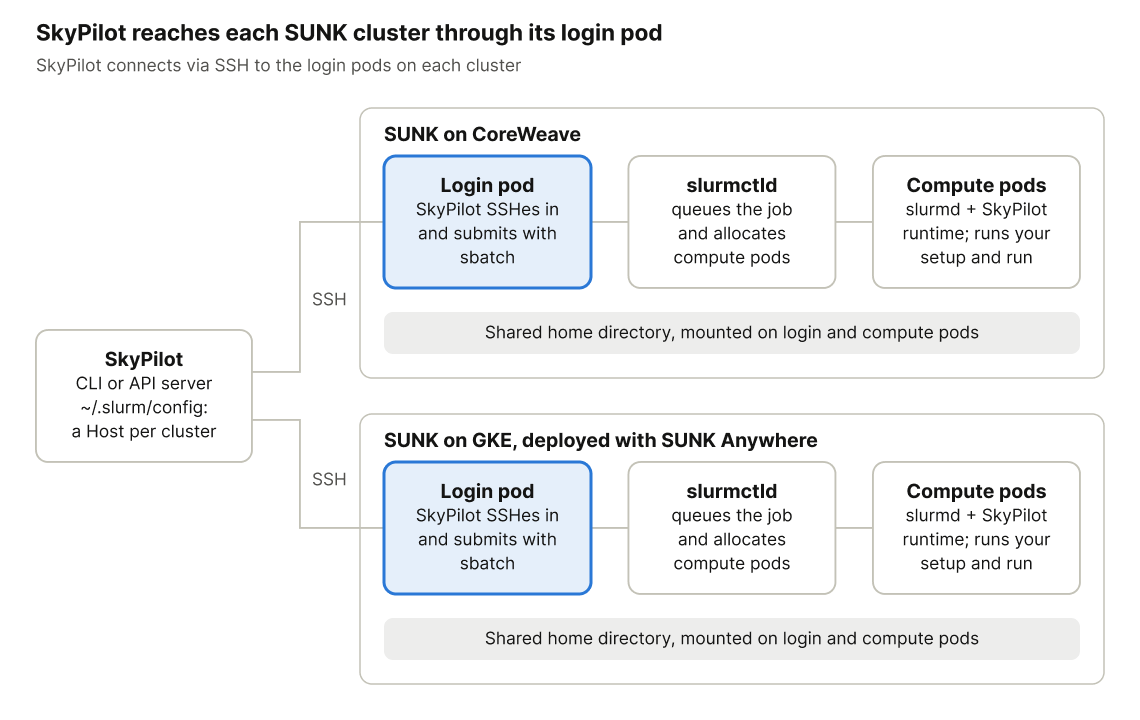
SkyPilot connects to each cluster's Slurm login node using SSH, whether it's SUNK Anywhere on GKE or SUNK on CoreWeave. Each cluster is one SSH Host entry in ~/.slurm/config that points at the cluster's login node.
When you run sky launch, SkyPilot selects a cluster that meets your resource requirements and submits the job via sbatch. Once Slurm allocates the nodes, SkyPilot runs your task’s setup and run commands.
Specify the GPUs your workload can use, and let SkyPilot choose where to run it:
# train.yaml
resources:
  infra: slurm
  accelerators: {H100: 8, H200: 8}
  image_id: docker:nvcr.io/nvidia/pytorch:24.12-py3

workdir: .
run: python train.py
This task requests eight H100s or eight H200s. SkyPilot selects a suitable Slurm cluster and tries another if capacity is unavailable. Remove infra: slurm to also consider your Kubernetes clusters, such as CKS, and any clouds you have enabled.
Try SUNK Anywhere on GKE alongside SUNK on CoreWeave
Here’s an example with a GKE cluster deployed with SUNK Anywhere, alongside a SUNK cluster on CoreWeave.
Step 1: Deploy SUNK Anywhere on GKE
To set up the GKE cluster, follow the SUNK Anywhere deployment guide, which installs SUNK and Slurm with two Helm charts (Steps 5 and 6), then add GPU nodes with the add-gpu-nodes-to-gke skill. To automate the whole deployment, point your coding agent at the deploy-sunk-on-gke skill; it also sets up Pyxis, which Slurm needs to run container images like the one in train.yaml.
The example below uses H100 GPUs on GKE and H200 GPUs on CoreWeave, requesting eight GPUs on a single worker node. Configure your GPU workers accordingly, or update the accelerators field in train.yaml to match your available GPU type and count. Complete the GPU setup and verification steps before connecting SkyPilot. With SUNK Anywhere deployed, you have Slurm with a login node, storage management, and per-cluster observability hooks.
Step 2: Connect SkyPilot to both clusters
The SSH configuration below assumes you have enabled external access to the GKE Slurm login service. Set login.service.type to LoadBalancer in your GKE Slurm configuration, apply the change through the deployment workflow, and allow SSH access from the machine running SkyPilot. Replace <GKE-LOGIN-IP> with the service’s assigned external IP.
GKE uses a ClusterIP service by default. If you keep that default, follow the SSH access instructions to establish port-forwarding, then use HostName localhost and Port 2222 for the sunk-gke entry. Keep the port-forward running while SkyPilot uses the connection.
Add both clusters to ~/.slurm/config:
# ~/.slurm/config
Host sunk-coreweave
    HostName <COREWEAVE-LOGIN-IP>
    User <USERNAME>
    IdentityFile ~/.ssh/id_ed25519

Host sunk-gke
    HostName <GKE-LOGIN-IP>
    User <USERNAME>
    IdentityFile ~/.ssh/id_ed25519
The connect-skypilot-to-sunk agent skill can guide you through configuring SSH and creating these entries for SUNK Anywhere clusters and for SUNK on CoreWeave.
Check that SkyPilot sees both clusters and their GPUs:
$ sky check slurm
 Slurm: enabled [compute]
    Allowed clusters:
    ├── sunk-coreweave: enabled
    └── sunk-gke: enabled
$ sky gpus list --infra slurm
Slurm GPUs
Slurm Cluster: sunk-coreweave
GPU REQUESTABLE_QTY_PER_NODE UTILIZATION
H200 1, 2, 4, 8 16 of 16 free
Slurm Cluster: sunk-gke
GPU  REQUESTABLE_QTY_PER_NODE UTILIZATION
H100 1, 2, 4, 8  8 of 16 free
Step 3: Launch the same job on either cluster
Then let SkyPilot select a cluster, or choose one explicitly:
$ sky launch -c train train.yaml                          # any SUNK cluster that fits
YAML to run: train.yaml
Considered resources (1 node):
------------------------------------------------------------------------------------
 INFRA                    INSTANCE   vCPUs   Mem(GB)   GPUS     COST ($)   CHOSEN
------------------------------------------------------------------------------------
 Slurm (sunk-coreweave)   -          32      128       H200:8   0.00          ✔
 Slurm (sunk-gke)         -          32      128       H100:8   0.00
------------------------------------------------------------------------------------
Launching a new cluster 'train'. Proceed? [Y/n]: y
⚙︎ Launching on Slurm.
✓ Cluster launched: train.
⚙︎ Syncing files.
✓ Synced workdir.
⚙︎ Job submitted, ID: 1
├── Waiting for task resources on 1 node.
└── Job started. Streaming logs... (Ctrl-C to exit log streaming; job will not be killed)
(task, pid=4661) Training on NVIDIA H200
(task, pid=4661) Dataset: 4096 synthetic examples, 128 features, 10 classes
(task, pid=4661) Epoch 01/10 | loss: 2.0124
(task, pid=4661) Epoch 02/10 | loss: 1.1913
(task, pid=4661) Epoch 03/10 | loss: 0.6096
(task, pid=4661) Epoch 04/10 | loss: 0.3354
(task, pid=4661) Epoch 05/10 | loss: 0.2066
(task, pid=4661) Epoch 06/10 | loss: 0.1378
(task, pid=4661) Epoch 07/10 | loss: 0.0960
(task, pid=4661) Epoch 08/10 | loss: 0.0699
(task, pid=4661) Epoch 09/10 | loss: 0.0532
(task, pid=4661) Epoch 10/10 | loss: 0.0419
(task, pid=4661) Training complete. Checkpoint saved to model.pt
✓ Job finished (status: SUCCEEDED).
$ sky launch -c train-gke --infra slurm/sunk-gke train.yaml   # SUNK on GKE only
The same task YAML works across both clusters. Change only --infra to choose where it runs.
Tested with SkyPilot v0.14, SUNK Anywhere (SUNK 8.0.0) on GKE, and SUNK 7.2.0 on CoreWeave.
The industry’s first unified training system, now on the Kubernetes you already have. SUNK Anywhere is available for teams running Kubernetes outside CoreWeave. Talk to us about SUNK Anywhere to check eligibility and get started.
Running more than one SUNK or Kubernetes cluster? See SkyPilot run them as one pool in a live demo with the SkyPilot team.
Resources
- CoreWeave docs: SkyPilot on SUNK tutorial
- SUNK Anywhere: the sunk-anywhere repo and its GKE deployment guide
- SUNK Anywhere: product overview
- SkyPilot docs: Getting Started on Slurm
- SkyPilot community: Slack and GitHub